· ARJUN · WRITING
How Does an LLM Agent Actually Finish a Task?
From reading a codebase and running tests to changing course after an error, an Agent works through a repeated act-observe-adjust loop.
If you reduce an Agent to “an LLM with a few tools,” you miss the part that makes the system work: what keeps the task moving, and what decides when to stop?
A single LLM call without a tool loop generally produces one response from the input it already has. An Agent adds a runtime that connects multiple model calls with tool execution, allowing the system to choose an action, inspect the result, update its state, and decide what to do next.
The difference becomes clearer with a common programming task.
Start with a GitHub Issue
Suppose the task is:
Fix an intermittent bug that sends users back to the login page after they sign in, and explain what changed.
An ordinary LLM call can only work with the code and description included in its input. Without repository access and execution tools, it cannot discover which files exist or actually run the test suite.
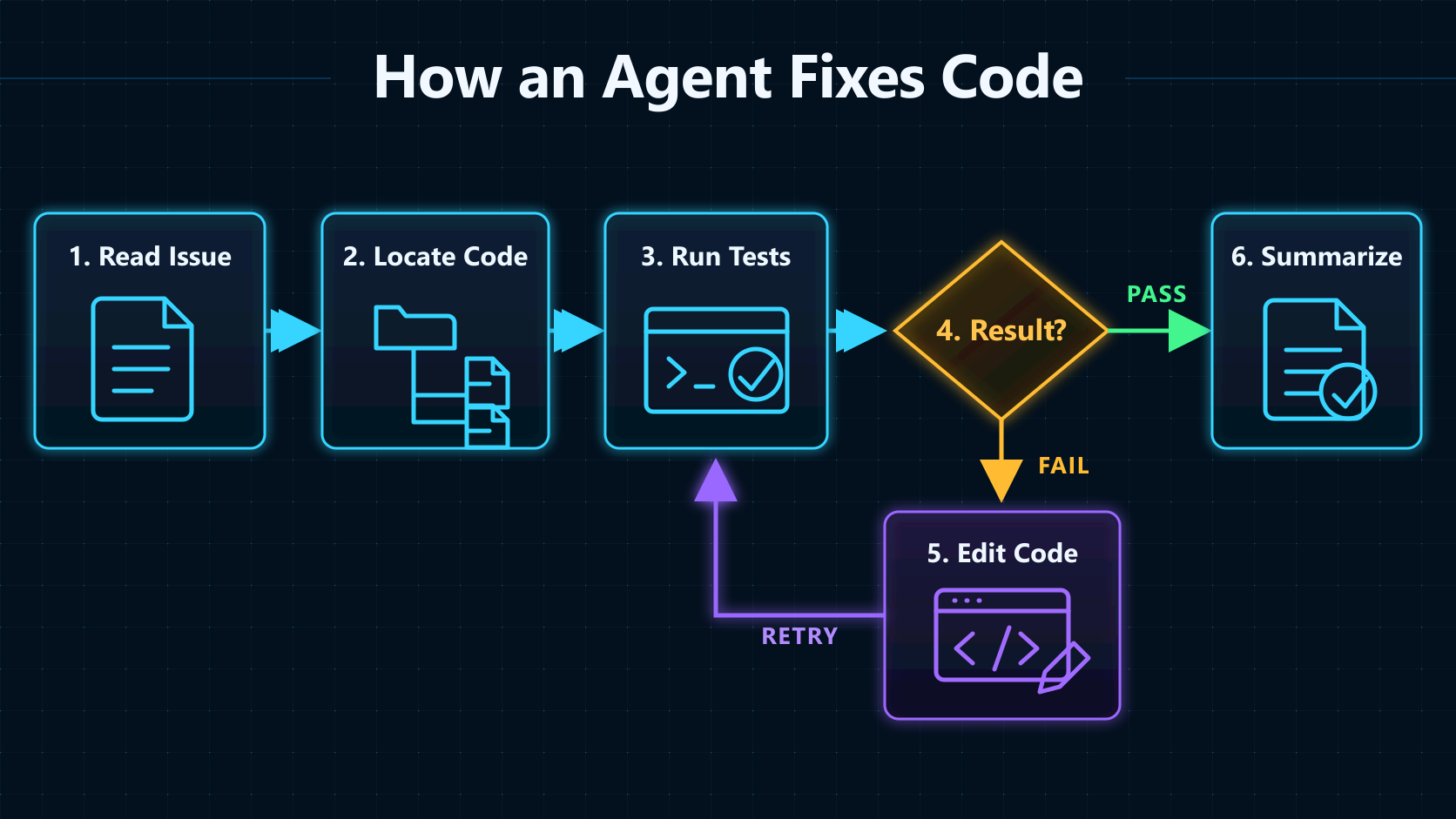
An Agent with access to the repository might proceed like this:
- Read the Issue and repository structure, then look for code related to login, Session handling, and routing.
- Open the likely files and form a cause hypothesis that can be tested.
- Run existing tests or a reproduction command and inspect the output.
- Change the code and run the tests again.
- If the tests fail, revise the change using the new evidence. If they pass, produce a summary of the fix.
The exact number of steps is not the important part. What matters is that the full path cannot be hard-coded before the task begins. The Agent has to inspect the repository and test results before it can decide which file to open or which command to run next.
An Agent Is Built Around a Feedback Loop
Products and frameworks do not all use the word Agent in exactly the same way. A useful engineering test is:
When an LLM can choose its next action from the current state, then use results from the environment to continue the task, the system is working as an Agent.
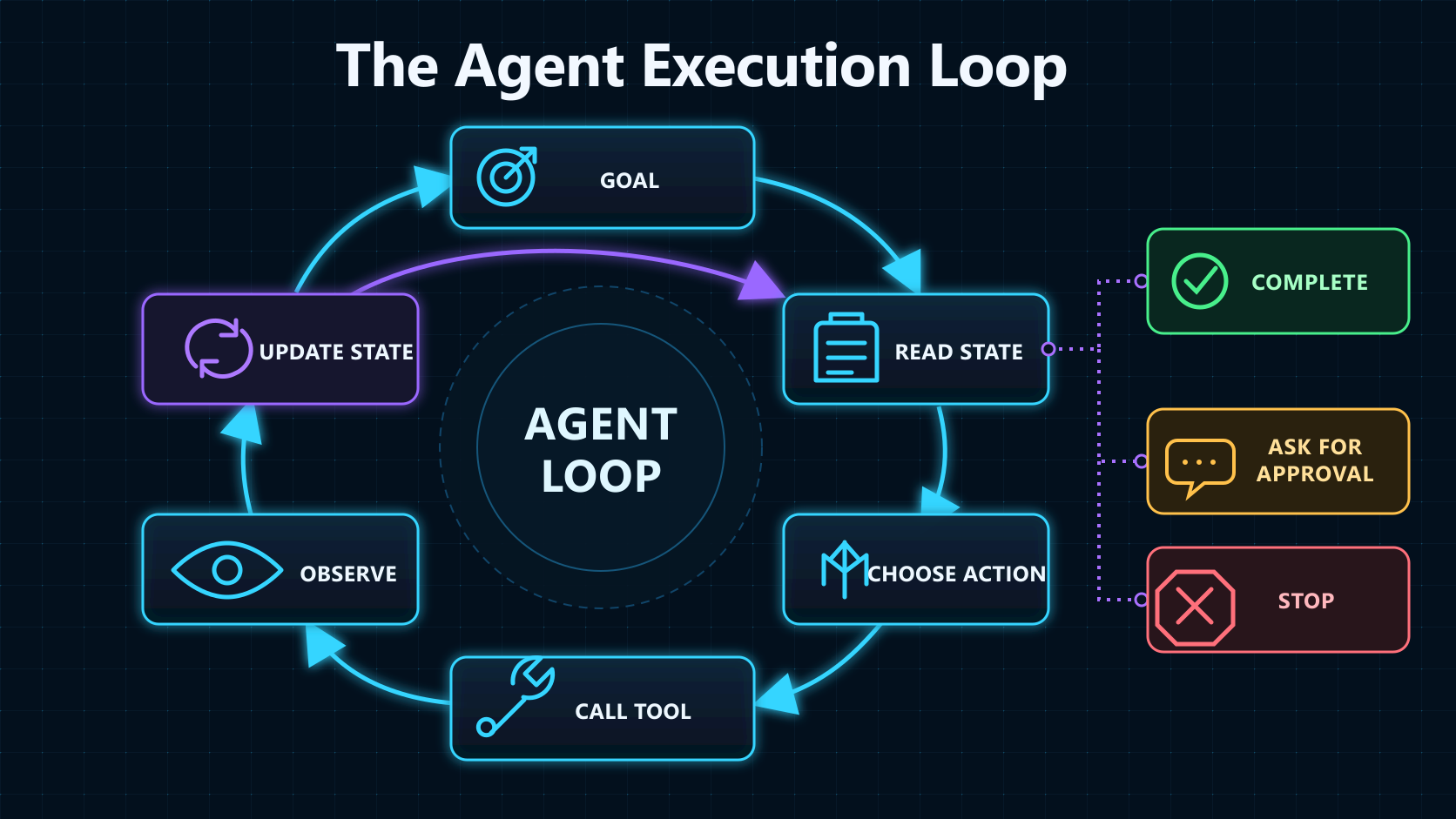
The smallest useful loop looks like this:
state = task goal + currently known information

while the task has not ended:
    action = model chooses the next action from state
    observation = runtime executes the action and gets a result
    state = update the current state with observation
Common exits include:
- The goal is complete, so the system returns a final result.
- Required information is missing or a risky action needs approval, so the system pauses and asks the user.
- A time, cost, or maximum-turn limit is reached, so the system stops and reports its progress.
- A tool fails, the task is cancelled, or the runtime encounters an exception, so the system preserves the current run state where possible and exits.
An Agent is therefore not a standalone model capability. It is system behavior produced by the model and the runtime together. The model proposes actions; the runtime executes tools, stores state, controls the loop, and handles failures.
What a Runnable Agent Needs
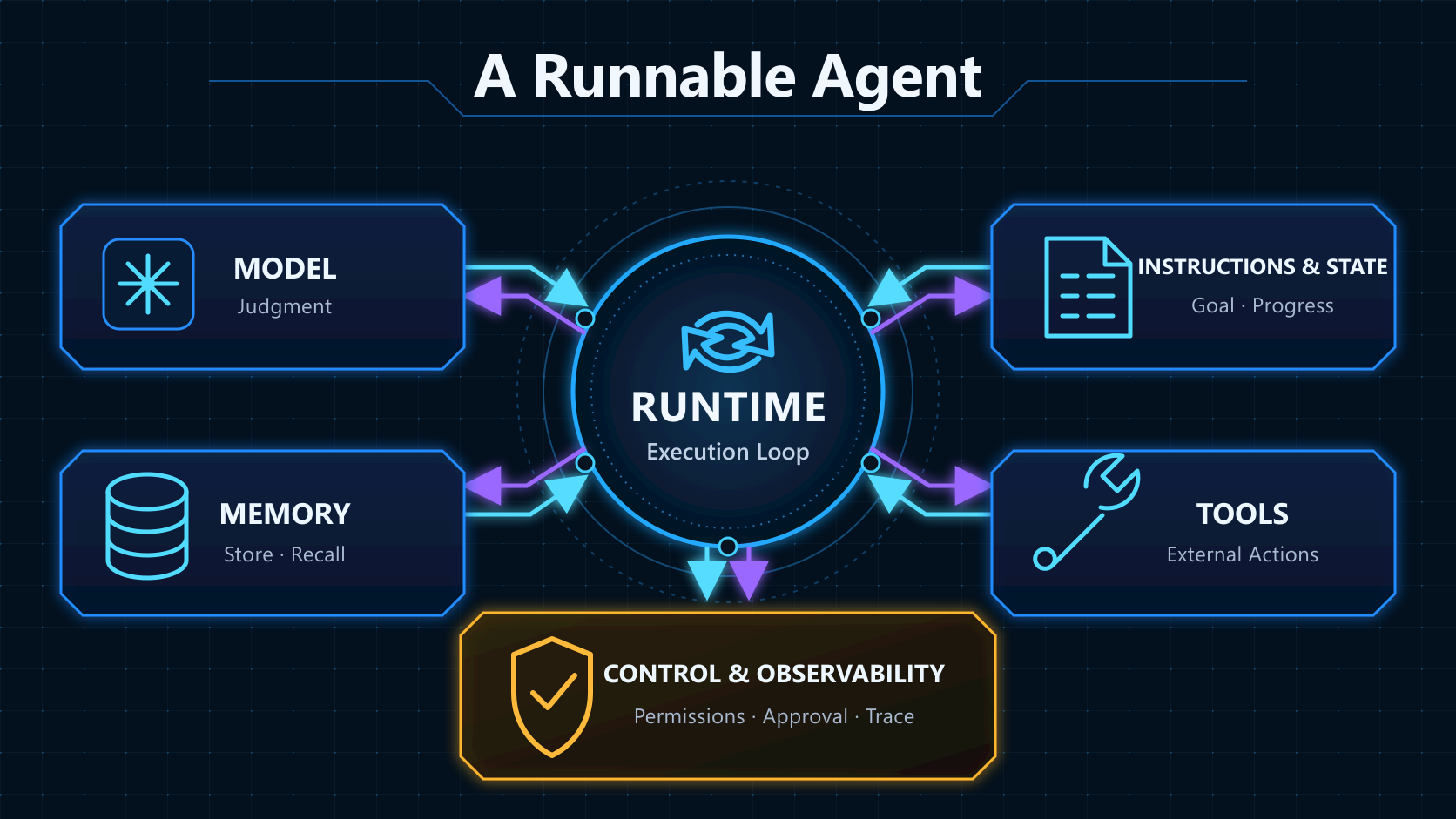
The familiar four-part summary—LLM, planning, memory, and tools—is useful, but incomplete. This article examines a runnable Agent through six engineering concerns.
1. Model: Choose Under Uncertainty
The model interprets the goal, compares possible actions, reads tool results, and produces the next executable instruction. Model quality matters, but it is not the only limit on system quality.
The same model can still choose the wrong tool when descriptions are vague, the context is crowded with irrelevant material, or the execution logic is confused. Clear instructions, a small set of distinct tools, and verifiable feedback usually produce a more stable system.
2. Instructions and State: Define the Goal and Current Position
Instructions define the task, boundaries, and output requirements. State records how far execution has progressed, which results are already available, and which questions remain unresolved.
State is more than chat history. It may include:
- the current task list;
- files already read and search results already collected;
- tool outputs;
- actions the user has approved or rejected;
- remaining turn, cost, and time budgets.
Without reliable state, every turn resembles a fresh start. The Agent may repeat searches, forget constraints, or perform the same action twice.
3. Tools: Turn a Textual Decision into an External Action
A tool might search the web, query a database, call an HTTP API, execute code, manipulate files, or invoke another service that handles a specialized task.
A typical Tool Calling flow is:
- The application provides the model with the tool name, purpose, and parameter schema.
- The model returns a structured call, such as a tool name with JSON arguments.
- The application validates the arguments and permissions, then invokes the tool.
- The result returns to the model as input to the next decision.
The language model’s text-generation process is not directly opening a database or changing a file. External operations run in the host application, a local runtime, or a provider-hosted tool environment.
More tools are not automatically better. Overlapping capabilities and vague names make selection harder, while tools that modify data widen the permission boundary. A small, clearly differentiated toolset is usually easier to control than dozens of similar interfaces.
4. Runtime: Keep Decision, Action, and Observation Moving
This layer may be called a Runner, Orchestrator, or Agent Loop. Its responsibilities include:
- sending the current state to the model;
- parsing model output;
- invoking tools and collecting results;
- appending results to the next model input;
- deciding whether the task is complete, paused, failed, or over a limit;
- preserving the run when it needs to resume later.
One model response containing one tool call does not necessarily make a system an Agent. It becomes a feedback loop when the system can inspect a tool result and then choose another action.
5. Memory: Decide What Is Worth Keeping
Memory can be divided by scope:
- Short-term memory serves the current task or conversation, including messages, tool results, and progress. It is usually part of the current run state.
- Long-term memory stores preferences, business facts, past experience, or reusable rules across sessions.
Long-term memory is not synonymous with a vector database. A language preference may be one structured record. Task state may live in SQL or a KV store. Document passages may be a good fit for vector retrieval. Start by deciding what must be remembered, then choose how it should be stored and retrieved.
Memory also needs a write policy. Permanently storing every conversation does not automatically make a system smarter. It can instead accumulate stale information, preserve mistakes, and create privacy problems.
6. Control and Observability: See What Happened and Limit What Can Happen
Because an Agent can perform real operations, it needs an explicit control plane:
- separate permissions for read and write operations;
- require human approval before deletion, payment, or sending messages;
- set timeouts, retries, and idempotency rules for tools;
- record model calls, tool arguments, results, and state changes;
- enforce turn, cost, and time limits to stop runaway loops.
A log may tell you that an error occurred. A useful Trace should also let you reconstruct what the model saw, which tool it selected, what the tool returned, and how the state moved to the next step.
Planning Is Not a Plan That Can Never Change
Complex tasks need planning, but planning does not have to be a separate module or a complete checklist generated at the beginning.
Here are two common approaches.
ReAct: Act, Observe, and Adjust
ReAct interleaves reasoning and action. The Agent chooses an action, receives an Observation from the environment, and uses that information to update what it does next.
ReAct is therefore a feedback-driven loop, not planning without feedback. It fits search, debugging, and code modification, where each intermediate result may change the remaining path.
For example, an Agent may first suspect that an expired Cookie causes the login bug. A test then shows that the reverse proxy failed to forward the protocol header. That new Observation changes the direction of the investigation.
Plan-and-Execute: Separate the Route from the Steps
Another approach creates a higher-level plan first, then lets an executor work through it. It is useful when the goal is clear and the stages have recognizable boundaries.
The plan still should not be treated as immutable. When a step fails or new evidence appears, the system needs to replan. Otherwise, “following the plan” only automates the repetition of a mistake.
Reflection and retries can be added to either approach, but they are not free capabilities. Without verifiable feedback, repeated self-evaluation may spend more tokens only to produce a differently worded answer.
Workflow or Agent?
Not every multi-step LLM application needs an Agent.
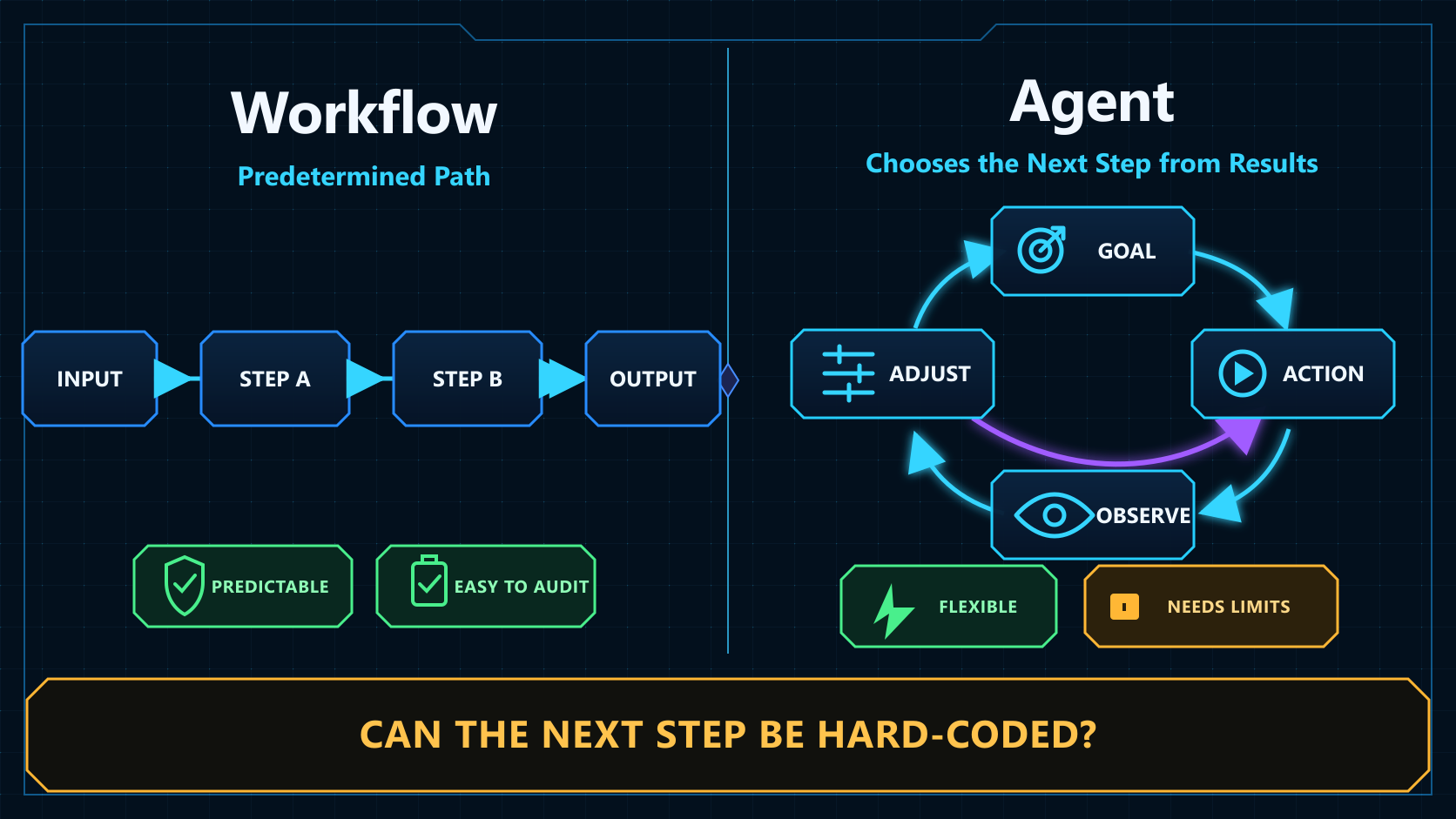
Prefer a Workflow when the steps are fixed, the branches are limited, and each condition can be expressed in code. For example: upload a contract, extract fields, check completeness, and write the result to a database. This path is easier to predict, test, and audit.
An Agent becomes useful when each next step depends on new information and the complete path cannot be listed in advance. Examples include investigating a production incident, modifying an unfamiliar codebase, and conducting multi-round research.
Ask three questions:
- Can code determine the next step before execution begins?
- If not, does the model need to choose an action dynamically from new evidence?
- Does the task have an observable, verifiable completion condition?
If the first answer is yes, a Workflow is usually a better fit. If the first answer is no and the second is yes, the problem is closer to an Agent use case. The third answer does not decide the label, but it does decide whether the run can be evaluated and stopped reliably.
Multi-Agent Is Not the Default Upgrade
Splitting one Agent into several roles can isolate context and tool permissions, and it may allow truly independent tasks to run in parallel. It also adds handoffs, conflicts, latency, and debugging cost.
Consider multiple Agents when one Agent can no longer manage the context clearly, or when the task contains specialized units that can be verified independently. Otherwise, one model with a well-designed toolset and a clear execution loop is usually easier to ship.
Judge an Agent by Its Execution Path
Do not decide whether a system is an Agent from the product name. Look for this path:
Goal
  → read current state
  → choose an action
  → invoke a tool
  → receive an environmental result
  → update state
  → continue, finish, or request human approval
The LLM supplies language understanding and proposes actions. Tools let the system affect the outside world. The runtime connects individual actions into a process. State and memory preserve continuity. Permissions, approvals, and Traces keep the process bounded and explainable.
The design problem is not to invent an impressive-sounding Agent role. It is to build an execution path that moves forward from evidence, stops when something goes wrong, and leaves enough information for a person to understand what happened.
References
- Anthropic, Building effective agents: the Workflow/Agent distinction, feedback loops, and suitable use cases.
- Yao et al., ReAct: Synergizing Reasoning and Acting in Language Models: interleaving reasoning, action, and environmental feedback.
- Shinn et al., Reflexion: Language Agents with Verbal Reinforcement Learning: using feedback and verbal reflection to improve later attempts.
- OpenAI Agents SDK: Agents: instructions, tools, runtime behavior, and orchestration boundaries.
- OpenAI Agents SDK: Running agents: the loop formed by model calls, tool results, completion conditions, and turn limits.
- OpenAI Agents SDK: Tools: tool types, structured arguments, and execution environments.
- LangChain Docs: Memory overview: short-term state, long-term memory, and storage choices.